Training Process
Finally, it’s time to combine all our previous code into a main script. In order to avoid to redeclare a new class for each main script (in the case of multiple
projects for a bigger application), we extends the JawTrainer class. Here we will write our training workflow inside the launch_training() method.
class SimpleMLPClassifier(JAWTrainer):

    def launch_training(self, epochs : int, device : torch.device, logdir : str, prefix : str) -> None:
        ...
Write the process
First, let’s plan a workflow to implement. Here we consider the following one :
Create a new log directory for this training
Create an optimizer with the model parameters
Send the model into the wanted devices
Use a tensorboard for monitor the training
- For each epoch :
Train the model
Save it if it’s better than the previous one
Update the tensorboard data
At the end, write a training summary
The JAW package contain some useful built-in methods for save and tracking part. First we create a new directory with an unique name for save the trained model :
# Create the directory "./logs" if it does not exist
top_logdir = "./logs"
if not os.path.exists(top_logdir):
    os.mkdir(top_logdir)

logdir = generate_unique_logpath(top_logdir, prefix)
print("Logging to {}".format(logdir))
# -> Prints out     Logging to   ./logs/simple_MLP_classifier_X
if not os.path.exists(logdir):
    os.mkdir(logdir)
Then, we send the model to the computation device,
optimizer = torch.optim.Adam(self.model.parameters())
self.model.to(device)
and handle its saving.
# We only keeping the best model (depends of the validation loss)
checkpoint = ModelCheckpoint(logdir + "/best_model.pt", self.model)
tensorboard_writer = SummaryWriter(log_dir=logdir)
The biggest is already written, we only need to call our train() and eval() function inside a loop.
for epoch in range(epochs):
    print("Epoch {}".format(epoch))
    self.train_func(self.model, self.train_loader, self.loss, optimizer, device)
    train_loss, train_acc = self.eval_func(self.model, self.train_loader, self.loss, device)
    val_loss, val_acc = self.eval_func(self.model, self.val_loader, self.loss, device)

    print(" Validation : Loss : {:.4f}, Acc : {:.4f}".format(val_loss, val_acc))

    # Check if the current model is better than the previous best.
    checkpoint.update(val_loss)
If we also want show theses informations (validation loss and accuracy) inside our tensorboard, we need to write them at the end of the loop like this :
for epoch in range(epochs):
    ...

    # Add the score of the training and validation loss and accuracy inside the tensorboard logs. You can decide to add more information
    # or keep only losses (it doesn't make sense to show the accuracy of a regression model).
    tensorboard_writer.add_scalar("metrics/train_loss", train_loss, epoch)
    tensorboard_writer.add_scalar("metrics/train_acc", train_acc, epoch)
    tensorboard_writer.add_scalar("metrics/val_loss", val_loss, epoch)
    tensorboard_writer.add_scalar("metrics/val_acc", val_acc, epoch)
Finally, we write our summary file inside the log directory
# Write the summary file
summary_text = self.get_summary_text(optimizer)
summary_file = open(logdir + "/summary.txt", "w")
summary_file.write(summary_text)
summary_file.close()

tensorboard_writer.add_text("Experiment summary", summary_text)
Note
You can display way more than just scalar values and a summary with TensorBoard. Check the documentation here for more info about it.
Define launch options
In order to facilitate our training launchs, we want be able to parametrize them directly inside the terminal command line. For that, we first write this short main function.
def main(args :  dict) -> None:

train_loader, val_loader, test_loader = load_dataset_FashionMNIST_with_standardization("dataset/")
model : torch.nn.Module = build_model(args["model"])
loss : torch.nn.Module = loss_name_to_class(args["loss"])

MNIST_training : SimpleMLPClassifier = SimpleMLPClassifier(model=model,
                                                           loss=loss,
                                                           train_loader=train_loader,
                                                           val_loader=val_loader,
                                                           test_loader=test_loader,
                                                           train_func=train.train,
                                                           eval_func=evaluation.test,
                                                           )

MNIST_training.launch_training(args["epochs"], get_device(), args["logdir"], args["prefix"])
Where build_model and loss_name_to_class are little interfaces between models name (in string format) given in argument and the concrete python object.
Note
Here we use an argument parser for interpret the command line arguments, but it’s only a matter of implementation. Another solution must likely be found if you use a job scheduling system, such as Slurm or OAR.
For this tutorial, we set the following commands :
parser = argparse.ArgumentParser()

parser.add_argument(
    "--epochs",
    type=int,
    help="Number of training epoch",
    default=None,
    required=True
)

parser.add_argument(
    "--loss",
    choices=["CrossEntropy", "RelativeL1", "RelativeL2"],
    help="Choose between CrossEntropy, RelativeL1 and RelativeL2.",
    action="store",
    required=True,
)

parser.add_argument(
    "--model",
    choices=["FC", "FCReg"],
    help="Choose between FC (Fully Connected) and FCReg (Regularized).",
    action="store",
    required=True,
)

parser.add_argument(
    "--logdir",
    type=str,
    help="Where write the result of the training and save the best model",
    default=None,
    required=True,
)

parser.add_argument(
    "--prefix",
    type=str,
    help="Prefix of the folder where you want to save your results.",
    default="my_model",
    required=False,
)
Launch the training
Your training script is now finished ! You can launch it by using a command with this shape :
python my_project/simple_MLP_classifier.py --epochs x --loss RelativeL2 --model FC --logdir logs
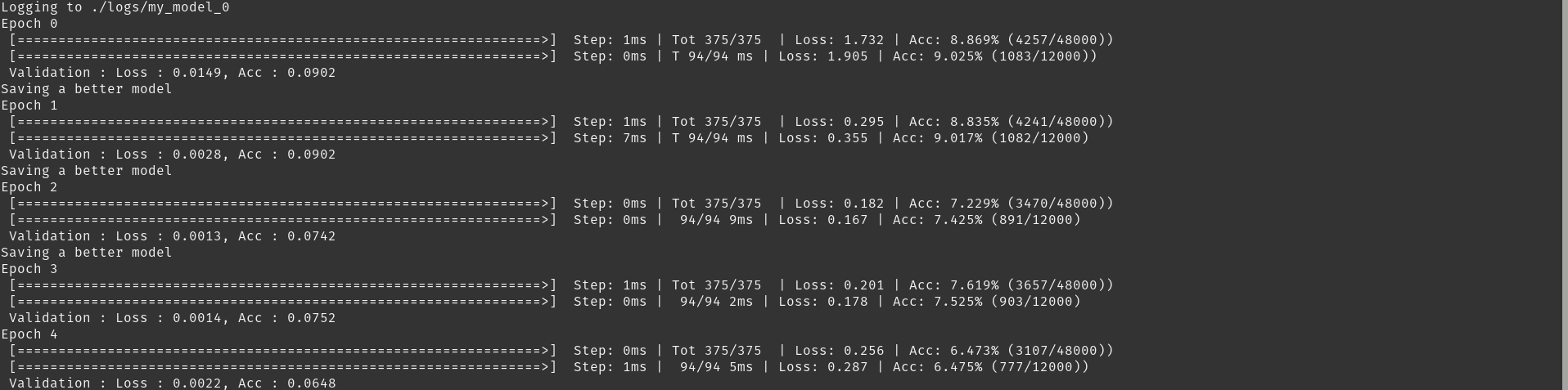
Obtained with the following command :
python example/fashionMNIST/simple_MLP_classifier.py --epochs 5
--loss RelativeL2 --model FCReg --logdir logs
If you want monitor your training with tensorboard, use this command for launch the board :
tensorboard --logdir logs/my_model_x #optional --port xxxx #6006 by default
Tip
If you run your training in another machine via ssh tunnel, you can use TensorBoard in local by forwarding a port of the distant machine to your local machine, with :
ssh -L 6006:localhost:6006 machine_ssh_name
Then run the tensorboard command in the distant machine and open the web page in your local web browser.